Get your voicemail as text
Takes about two minutes · Works with any carrier that can email you your voicemail
Most mobile carriers can send you a copy of each voicemail by email, with the recording attached. Point that at your personal Scribe address instead of your inbox, and your voicemail comes back to you as text.
You never give Scribe access to your email. You are forwarding one specific kind of message to one address we own. Nothing else in your mailbox is visible to us.
Steps
- Copy your Scribe address. Sign in at scribe.bim-computing.com
and find the voicemail block on your account page. It looks like
scribe-a1b2c3d4e5@bim-computing.com. It is unique to you, treat it like a password and don't post it publicly. - Turn on "Receive voicemail transcripts" on the same page, then save.
- Open your carrier's voicemail settings. With Free Mobile (France) that is Mon compte → Mon forfait mobile → Messagerie vocale. Other carriers call it "voicemail to email", "visual voicemail" or "notification par email".
- Add your Scribe address as a notification email, and choose the mode that attaches
the audio file. On Free that mode is called
"Fichier envoyé en attachement", this matters, because a notification with no
attachment has nothing to transcribe.
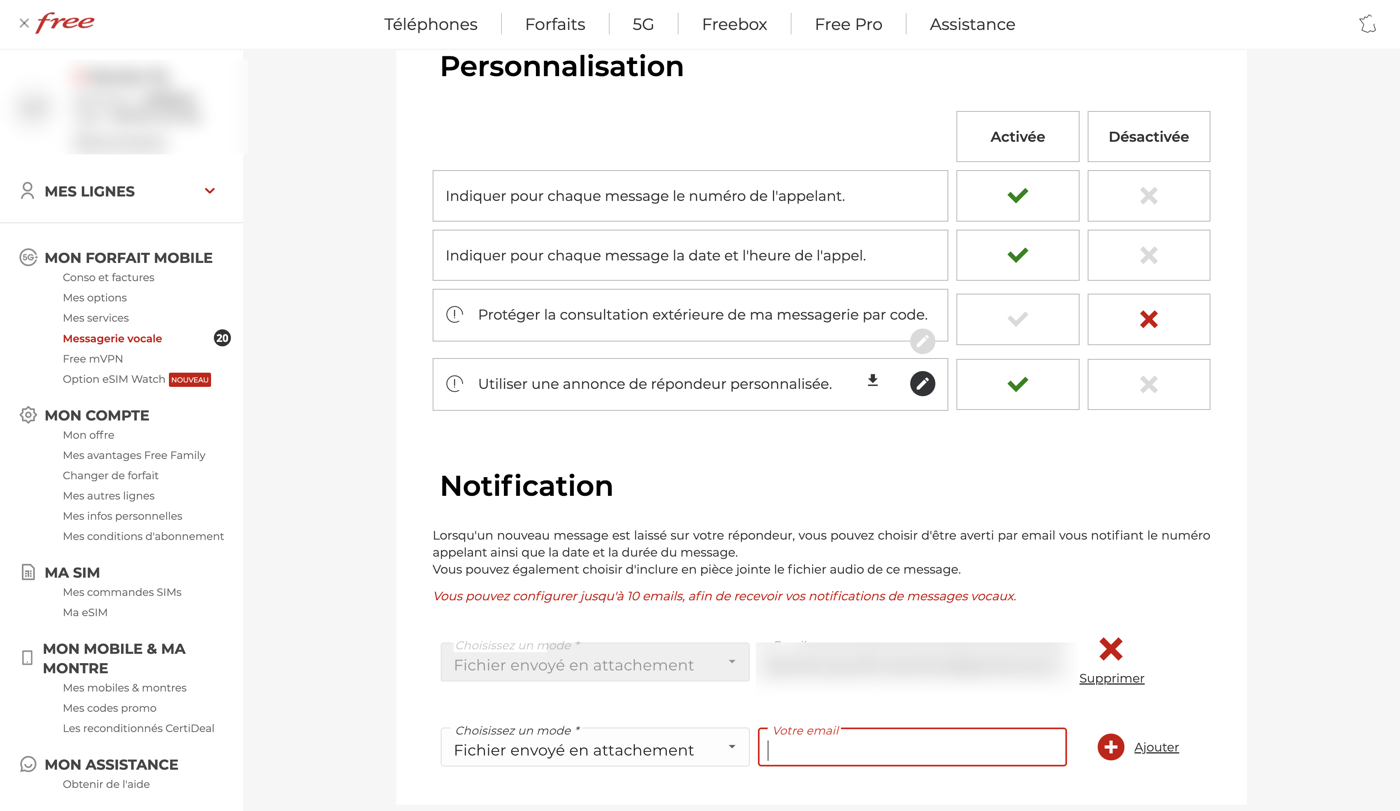
The Notification section. Pick the mode that attaches the file, paste your Scribe address in the email field, and add it. Free lets you configure up to 10 addresses, so you can keep your own as well. - Leave yourself on the list. Adding Scribe does not have to replace your own address, keep both and you get the recording and the transcript.
- Test it. Call your own number from another phone, leave a message, hang up. Within a minute or two the transcript arrives, marked 🎙️, in your WhatsApp Message-yourself chat (and by SMS if you enabled that).
If nothing arrives
- Check the mode attaches the audio. A plain "you have a new message" email has no recording in it and cannot be transcribed.
- Check the address is exactly right, including the
-and the code after it. One wrong character and it goes nowhere. - Check the voicemail toggle is on and saved in your Scribe account.
- Link WhatsApp, the transcript is delivered to your own WhatsApp chat, so Scribe needs to be connected. If you only want SMS, enable SMS delivery instead.